Writing an ontology
The main window of the MOL ontology editor appears as
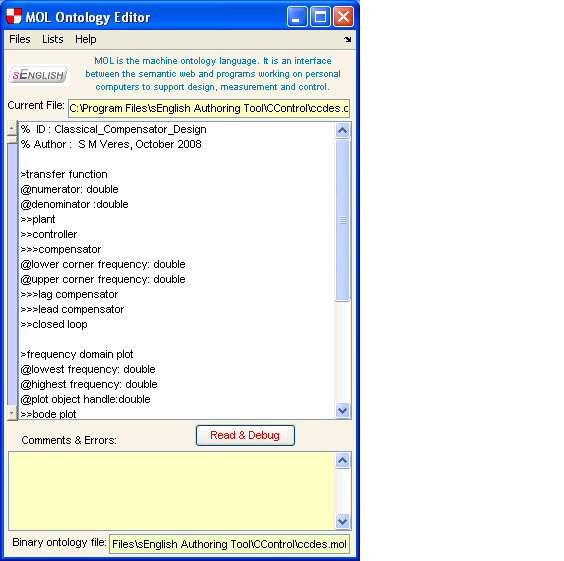
A MOL (=Machine Ontology Language) builts on the basic
types of a high level programming language such as MATLAB.
The fundamental features can be listed as follows:
- All MOL classes with attributes have individuals of class
"struct" as in MATLAB or C.
- All MOL classes with no attributes can be subclasses of either
of the basic MATLAB/C types such as "double", "char", "uint8",...
and also "cell".
- To avoid the need of a special editor to work on MOL files, a simple
and visually pleasing notation is used to define classes/subclasses and
their attributes:
- ">>..>" is used to declare a new class (max 3 words all in lower case).
Subclass is indicated by a higher number of ">" signs and its superclass is the
firs declaration above with a smaller number of ">" signs.
- "@attrib : class" is the format of declaring an attribute and its class.
"class" can be any declared class or a basic MATLAB/C type as defined above.
- "@@attrib : MATLAB expressing of 'attrib'" or "@@..: MATLAB expresstion of '..'"
can be sued to define
an attribute constraint or a constraint on the body of the object. The
MATLAB expression can contain a user defined m-function if needed.
- ":" sign after a class declaration starting with ">>..>" can be followed by
a sup class name.
- "--" sign after a class declaration starting with ">>..>" can be followed by piece of
MATLAB code or an M-function that defines a generic sample (=individual) of that class.
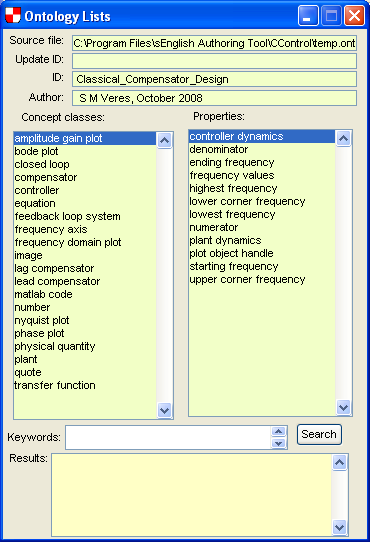
After applying the "Read & Debug" button and making necessary corrections, if there are error
messages, the lists of classes and properties used can be displayed:
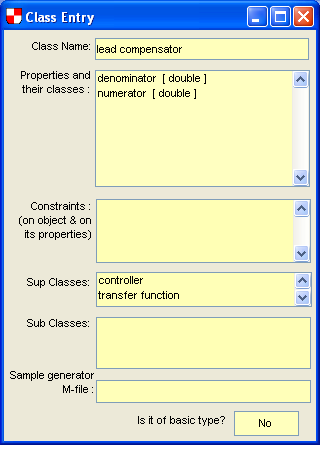
Clicking on any of them may display further windows with details of classes
The basic MATLAB/C classes can also be listed:
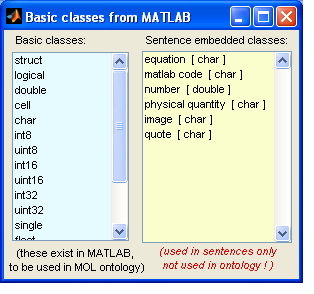
Note that there are 6 types of "embedded objects" that
can be used in sEnglish sentences:
- Mathematical symbols and equations placed between $...$ or $$....$$.
For HTML display they are converted to MathML.
- MATLAB code appearing between "..."
- Pure numbers such as 2, 467, -45.29, 34.12e-6 etc. that have no physical dimensions.
- Physical quantities such as ~3m , ~345m/s etc. These must start with ~ to indicate that they
are physical quantities with dimensions.
- Images that are included in the LaTex of HMTL documents. The format of their
use is as in HTML:
 for simplicity. For inclusion in LaTEx this is converted to a suitable
figure environment.
for simplicity. For inclusion in LaTEx this is converted to a suitable
figure environment.
- Quotes of text: these are between single quotes such as 'curvature' , 'Cosmos', etc.
Example sEnglish sentences using embedded objects are:
Use a factor of 2 in the computation of ~340m/s airflow with method 'Silvester' as displayed
in the figure  using formula $V=Av^2$.
Execute code "M=1:for k=1:N, M=M*N;end".
etc.
(c) SysBrain Ltd, 2008.